Keep on top of
the maintenance.
Keep work orders, planned maintenance, assets, parts and permits together. WorksReady helps engineers record the job, managers plan the workload, and directors and finance see the cost, the downtime and the history.

From reporting the fault to signing off the work.
Anyone can raise a request. Engineering approves it, plans it, isolates the machine if needed and closes it, and every step is recorded against the asset.
Report the fault
Scan the QR label on the machine, say what's wrong and add a photo. Engineering is alerted straight away.
RequestedApprove and assign
Set the priority, book engineers and contractors, reserve parts and ask for a contractor quotation if it is needed.
AssignedDo the work safely
Record the lockout and permit, then labour, parts, downtime and checks. A failed check raises its own follow-on job.
In progressReview the cost and history
Costs, downtime and failure codes feed MTBF, MTTR and repeat-fault reports, the directors' board and the finance view.
Signed offReal screens from release 1.4.5.
Every screen below comes from the WorksReady demo workspace, using a fictional manufacturer and sample data. Select one to open it in the product tour, which has 31 screens.
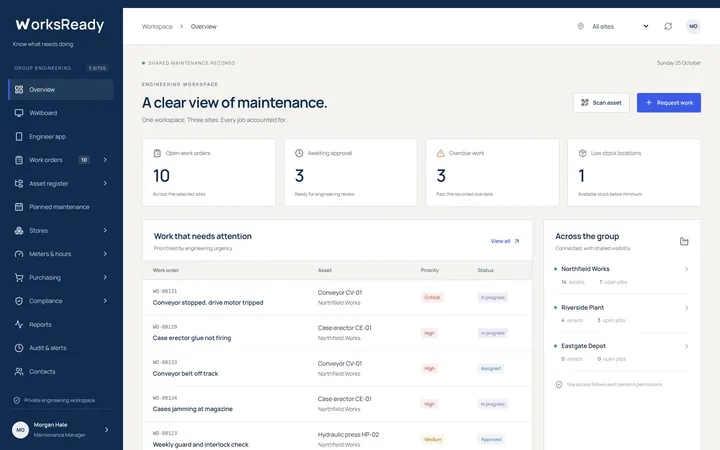 OverviewOpen, overdue and unowned work, low stock and this month's cost.
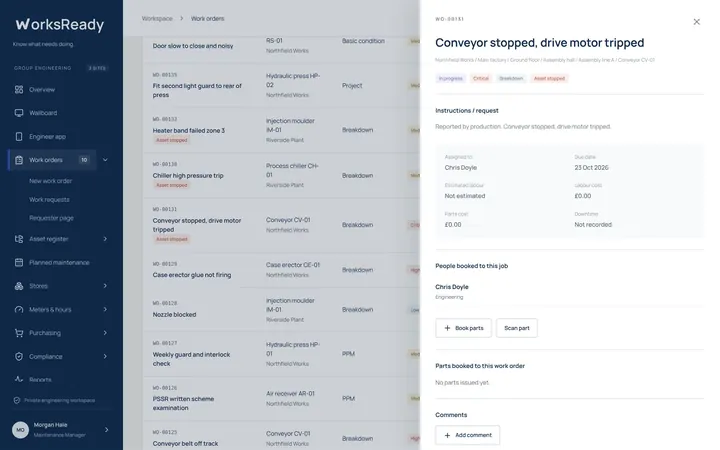 Work orderLabour, parts, downtime and response time on one job.
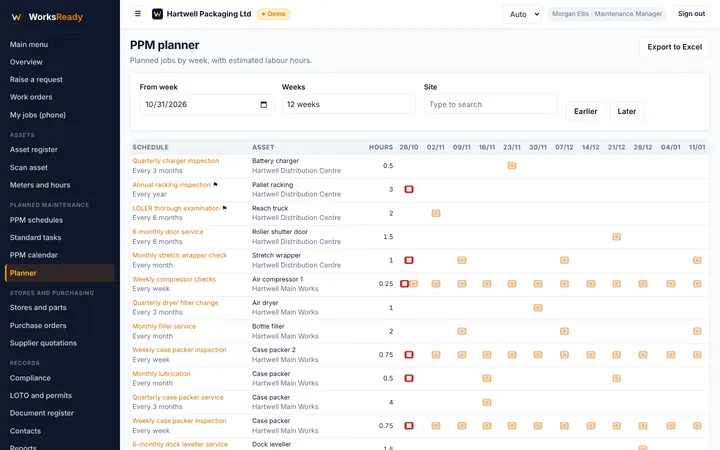 PPM plannerPlanned hours week by week, for every schedule and asset.
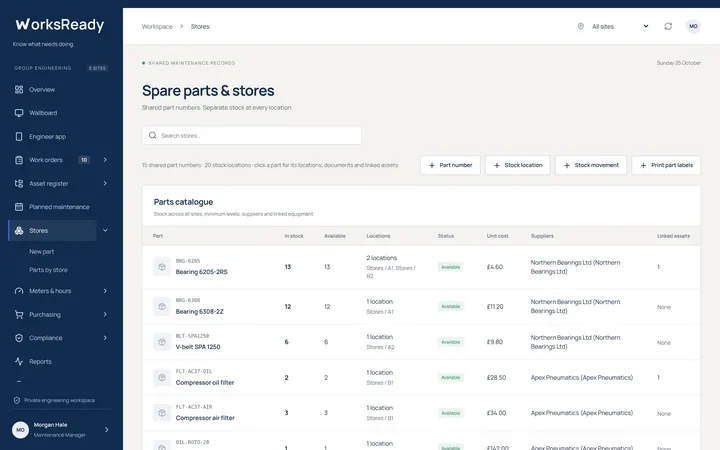 Stores and partsStock by site and bin, with low stock and inter-site requests.
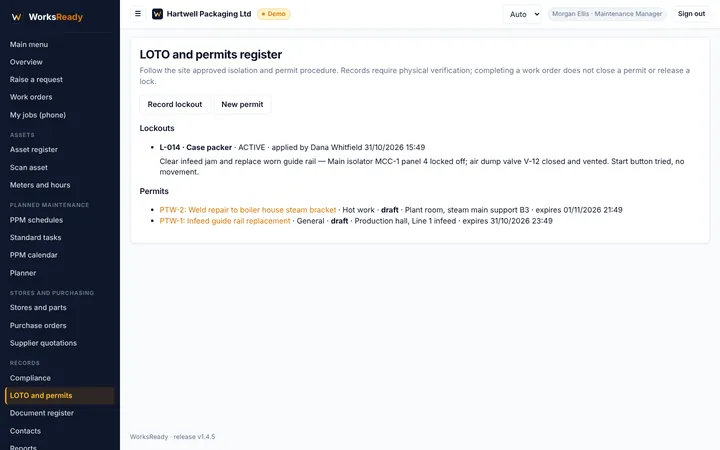 LOTO and permitsLockouts and permits to work, tied to the job and the asset.
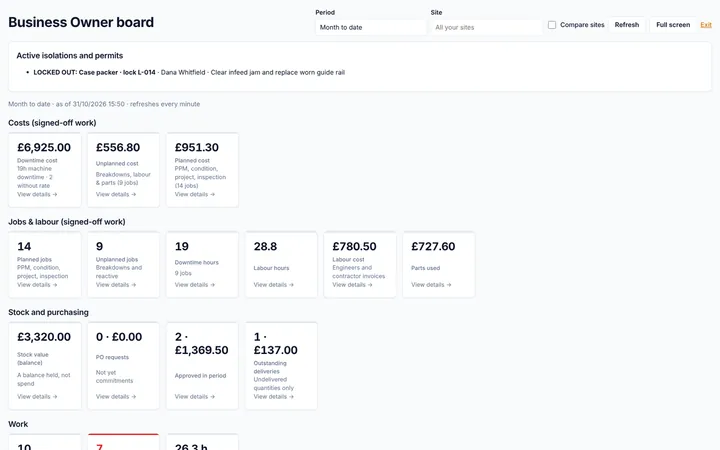 Directors' boardDowntime cost and spend, with the records behind every figure.
The work, the assets, the parts and the people.
Start with the job in front of you. Keep its history, planned checks, parts, permits and costs in the same working system.
Run the job from request to sign-off.
Requests are approved, assigned, worked and signed off with labour, parts, downtime, checks and signatures. Breakdowns carry a failure category, mode and fault code.
- Claim a job from someone who has gone home
- Unowned jobs flagged on the overview
- Job sheets as PDF
Find the asset and its history.
Follow the register from site to sub asset. Documents, photos, faults, moves and the full work history stay against the asset.
- QR and barcode labels
- Moves with a recorded reason
- Import from a spreadsheet
Give routine work a proper place.
Build PPMs from a library of standard tasks, with checks, readings and estimated labour. See them on a calendar and a yearly planner. Professional and Enterprise add run-hour scheduling with a forecast date.
- Parent and child PPMs
- Default engineer and priority
- Planner export to Excel on Enterprise
Isolate it and permit it.
Record lockouts with the isolation points and zero-energy check, and issue permits to work for hot work, height, confined space, electrical and general work.
- Only authorised isolators and issuers
- Jobs can require LOTO before work starts
- Active isolations on the wallboard
Check the parts before the job.
Register stores, shelves and bins at each site, keep one master record per part, and see stock, reservations and price history. Ask another site for a part when you run short.
- Minimum and maximum levels per site
- Part requests between sites on Enterprise
- Part labels and barcodes
Quote it, order it, receive it.
Request supplier quotations for low stock or contractor work, convert the chosen quote to a purchase order, and approve within each person's limit.
- Reorder suggestions grouped by supplier
- Approved values shown as committed spend
- Goods received straight into stock
Let usage inform the schedule.
Record meter readings on walk rounds, or weekly operating hours, so usage-based PPMs fall due with the work the machine has done and MTBF uses real hours.
- Printable reading sheets
- Usage graphs
- Meter replacement and reset
Use the work you have recorded.
52 reports covering assets, PPMs, current work, costs, performance, purchasing and compliance, plus a monthly management pack, emailed on a schedule. PDF on Professional; Excel and CSV on Enterprise.
- Downtime, MTBF, MTTR and repeat faults
- Planned versus reactive work
- Reports emailed on a schedule
Show the cost without the spreadsheet.
The directors' board shows downtime cost, planned and unplanned spend, stock and purchasing, and every figure opens the records behind it. Finance users see all-site costs and commitments.
- Finance logins are free
- Finance can draft POs but never approve them
- Excel and PDF export
Keep track of statutory checks.
Mark a PPM as statutory and name the regulation on any plan. On Enterprise it also appears in the compliance register alongside your insurance and other inspections.
Warnings go to the people you choose before each check is due, and again if it goes overdue.
Sign off a requirement with its evidence in one step, and export the whole register as an audit PDF for the board, HSE or your insurer.
Each asset shows its compliance status, and every change is in the audit trail.
Pick the plan that fits your team.
Choose the features and engineering accounts your team needs. Every plan includes unlimited requesters, so the people reporting faults do not need extra paid accounts.
Basic
For a site getting reactive and planned work under control.
- Asset register with QR labels
- Work requests and work orders
- PPMs, standard tasks and statutory PPMs
- Engineer mobile app
- Spreadsheet import
Professional
RecommendedFor a site that runs its own stores and wants the numbers.
- Everything in Basic
- Stores and parts
- Meters, run hours and MTBF
- All 52 reports
- Email notifications and reports emailed on a schedule
Enterprise
For groups running several sites with larger teams.
- Everything in Professional
- Purchasing and supplier quotations
- Part requests between sites
- LOTO and permits to work
- Compliance register and audit PDF
- Directors' board and finance view
- Repeat breakdown, statutory and push alerts
- Workshop wallboard
- Site security: choose which sites each person sees
- Excel and CSV export, including the PPM planner
- Priority support
Extra users. Add 5 more engineers for a one-off £75, or one more administrator for a one-off £75, on any plan. Maintenance managers count as engineers. Requesters, finance users, contractors, suppliers and read-only viewers are free on every plan.
Onboarding. Optional onboarding, where we import your asset register, set up your PPMs and print your QR labels, is £495 one-off and free with annual Professional and Enterprise plans.
Prices exclude VAT. Monthly and annual prices are shown above.
Your workspace and your records.
Your own workspace
Each customer gets their own application, database and files. Your records never share a database with another company.
Two-step sign-in
Administrators sign in with an authenticator app, and anyone can turn it on. You can see who is signed in, end sessions, and search every change in the audit trail.
Verified backups
Backed up every 6 hours and kept for 7 days. Every backup is checked after it's taken, and it can be restored into a separate test copy without touching the live system.
Take it with you
An administrator can export every business record to Excel or CSV at any time, in the same layout as the import templates. Reports download as PDF on Professional, and as Excel or CSV on Enterprise.
Common questions
Do engineers need to install an app?
No. The engineer app opens in the phone's browser and can be added to the home screen. It uses the camera to scan asset and part labels.
Can we bring our existing records?
Yes. Download the Excel templates for sites, locations, contacts, assets, stores, parts, PPMs, work history, meter readings and compliance items, fill them in and upload them. You see a preview first, and nothing is saved unless every row is valid.
Who counts as an engineer?
Engineers and maintenance managers. Requesters, finance users, read-only viewers, contractors and suppliers are unlimited on every plan. Basic and Professional include 5 engineers and 1 administrator, Enterprise 15 engineers and 2 administrators, and you can add 5 engineers or 1 administrator for a one-off £75.
Can contractors use it?
Yes. Contractors get their own free login to see the jobs assigned to them, and their permits on Enterprise, and suppliers can see their parts and orders.
Can engineers complete jobs without a signal?
WorksReady currently needs an internet connection. Offline job completion is not available, so check coverage where your engineers will use it.
Does it handle more than one site?
Every plan supports several sites in one asset register, with stores at each site on Professional and part requests between sites on Enterprise. Enterprise adds site security, so you can choose which sites each person can see.